

Photo: Karolina Grabowska / Pexels
"I have no idea which invoices are still open."
I heard that sentence almost every day during the first week. A mid-sized company - roughly 80 employees, multiple locations, traditional industry structure. Accounts payable processed 340 incoming invoices per month. Every single one was forwarded manually by email, collected in a shared Outlook inbox, checked off by hand.
The accountant spent 42 hours every month reviewing invoices, routing them to the right cost centres, and waiting for approvals. Approvals took several days on average - sometimes weeks if the responsible person was travelling.
The symptoms were textbook: Invoices landed in the wrong inbox or were missed entirely. Approvals stalled because the responsible employee was on holiday and nobody knew who the deputy was. There was no visibility into which invoices were open, approved, or overdue. Payment deadlines were missed - not because of cash flow problems, but because internal approval was too slow. Early payment discounts quietly slipped away.
The company had Microsoft 365 in place. Outlook, Teams, SharePoint - all licensed, all paid for. Just not used for processes like this. Similar optimization is possible with Teams-native approvals or AI-powered DATEV integration.
The Solution: A Fully Automated Approval Workflow in Microsoft 365
Instead of introducing new software, we built the entire invoice approval process on the existing Microsoft 365 infrastructure: Power Automate for the logic, SharePoint for storage and data management, Microsoft Teams for approval actions directly in chat.
The goal was clear: every invoice should be traceable from receipt to approval - no email ping-pong, no media breaks, no manual assignment.
Step 1: Automate Invoice Intake
A Power Automate flow monitors the dedicated invoice inbox. As soon as a new email with a PDF attachment arrives, the flow triggers. The invoice is automatically filed in a structured SharePoint library - sorted by month and cost centre. Metadata such as sender, date, subject, and amount are extracted and stored as SharePoint columns.
The key advantage: accounting no longer needs to forward emails or manually rename files. Every invoice is instantly in the system - with all relevant information attached.
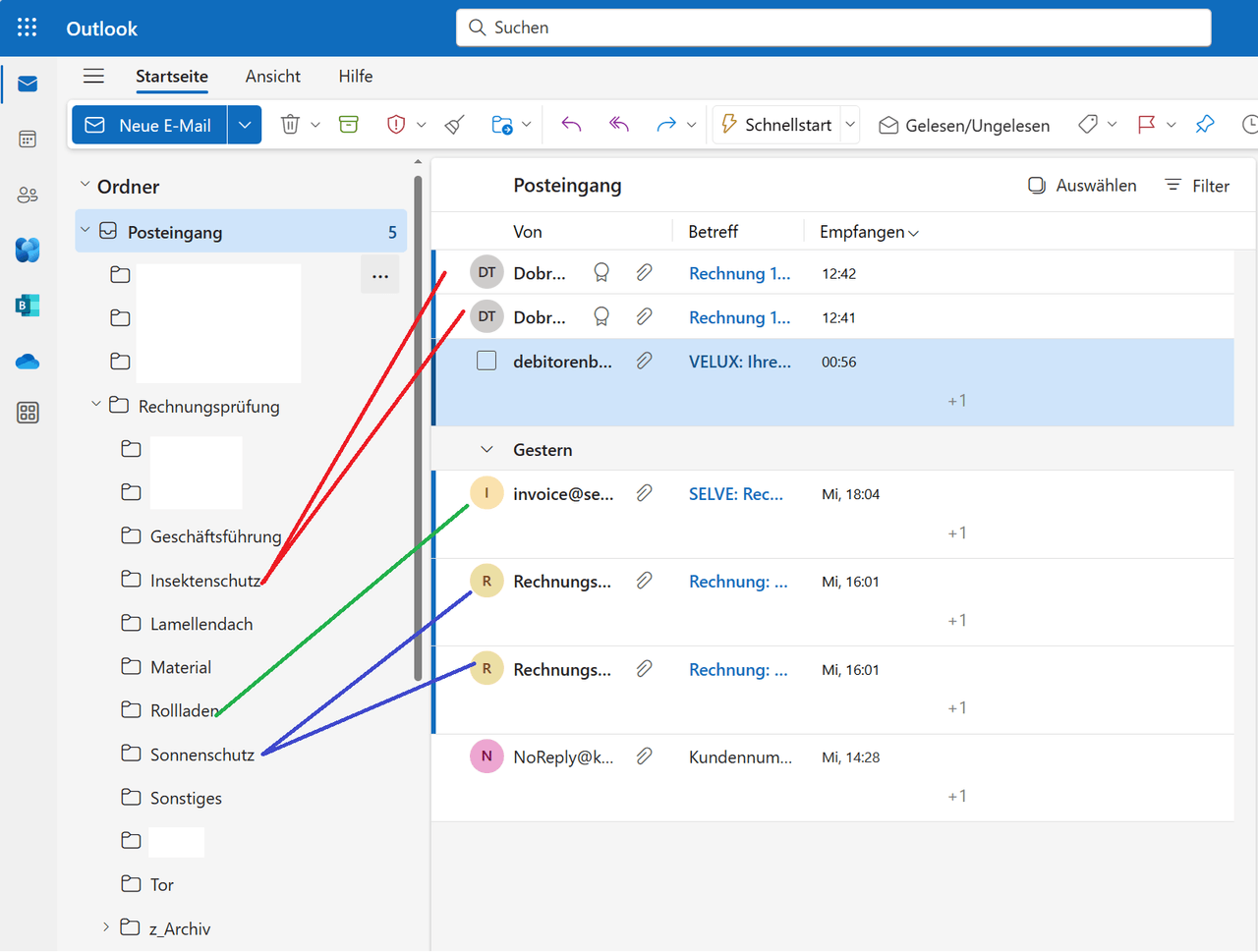 Figure: Incoming invoices from the inbox are automatically assigned to department folders for approval
Step 2: Smart Approval Logic with Deputy Rules
The heart of the system is the approval matrix: a SharePoint list defines which cost centre is approved by which employee - including deputies. The flow reads this matrix and automatically sends the approval request to the right person.
If the primary approver is absent - detected via their Outlook out-of-office reply - the flow automatically forwards the request to the configured deputy. No manual handoffs, no "Did you see my email?" messages. The process keeps moving, even when someone is on holiday.
The approval itself happens directly in Microsoft Teams: the approver receives an adaptive card in their chat - with an invoice preview, amount, supplier, and cost centre. Two buttons: Approve or Reject. No inbox to open, no document to search for - one click is all it takes.
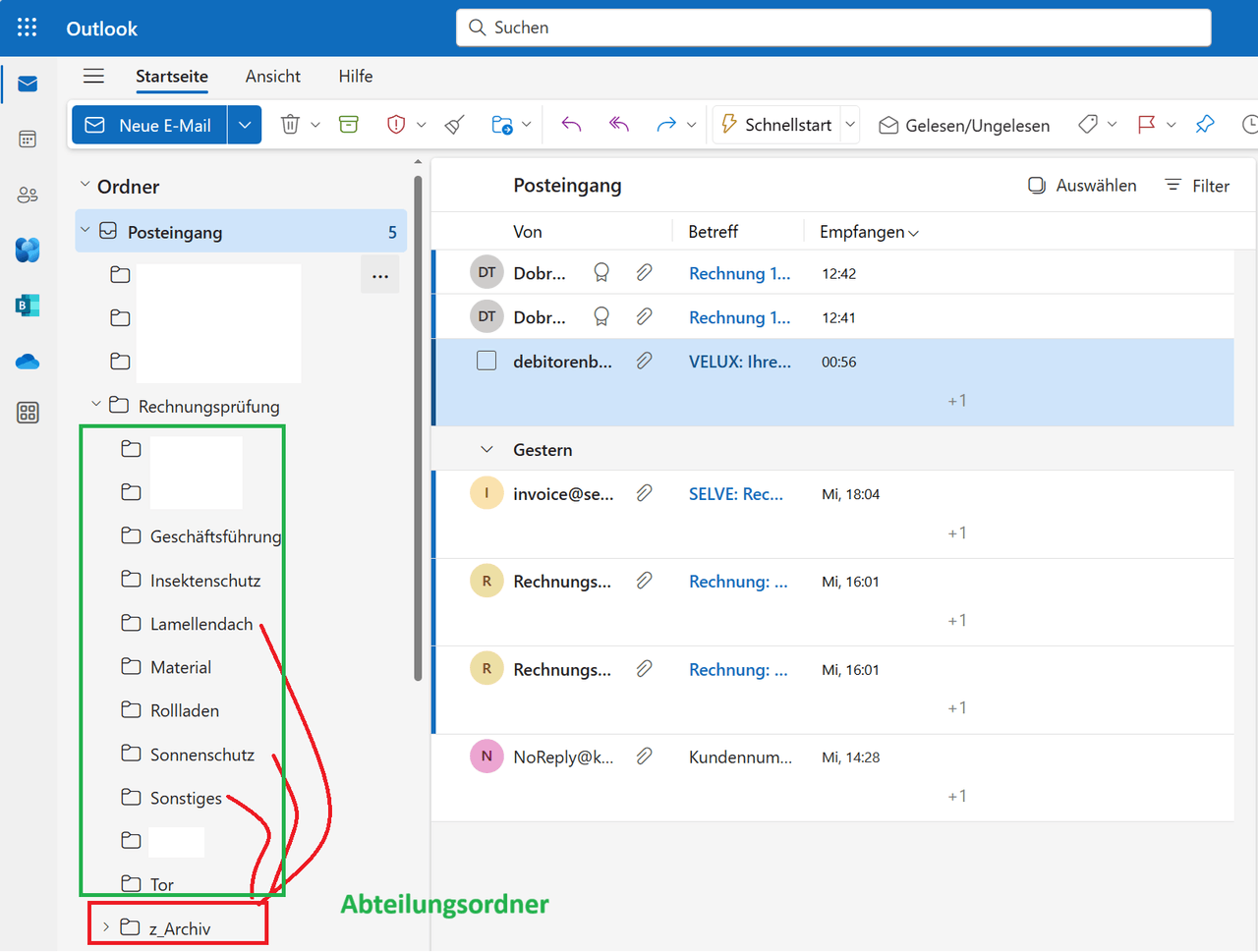 Figure: After automatic export to SharePoint, processed emails are automatically moved to archive
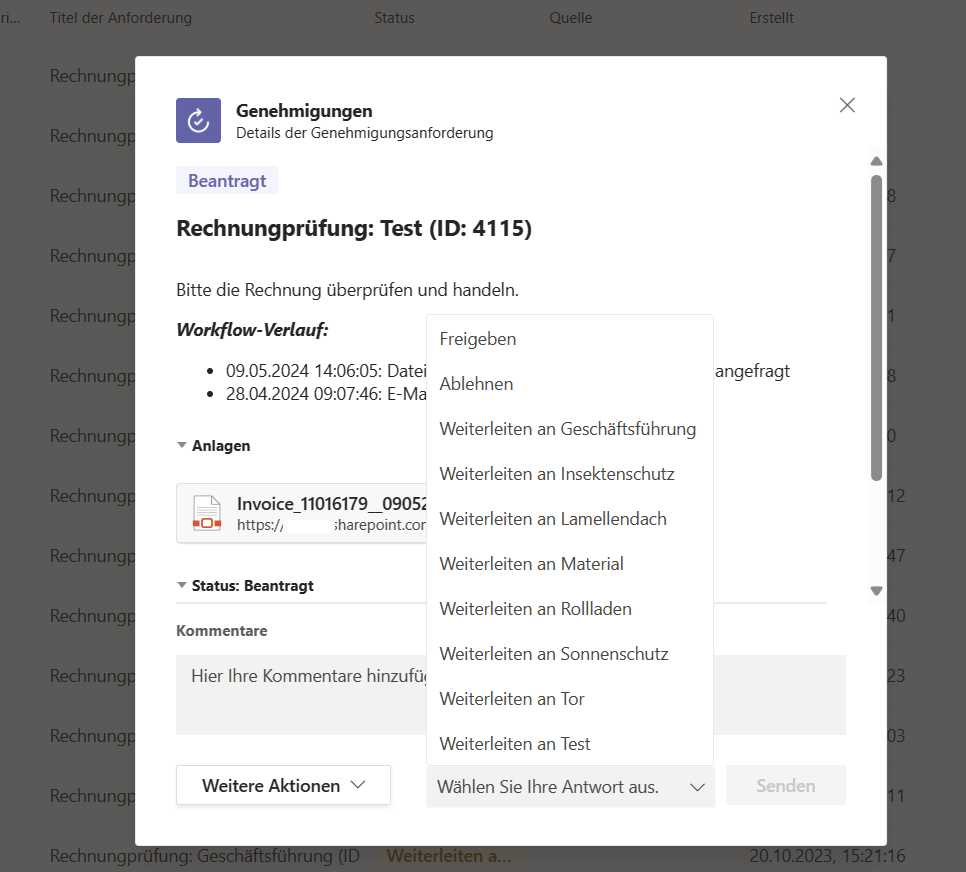 Figure: Teams Approvals detail view - invoice review with workflow history, file attachment, and approval options (Approve, Reject, Forward to department)
Step 3: Real-Time Status Tracking
In SharePoint, accounting has a live overview of all invoices: received, under review, approved, rejected, paid. Every invoice carries a colour-coded status. Payment deadlines are automatically highlighted - yellow when approaching, red when overdue.
This means: no more manual follow-ups. No more "Where's the invoice from Supplier X?" The accountant opens the SharePoint view and immediately sees where things are stuck.
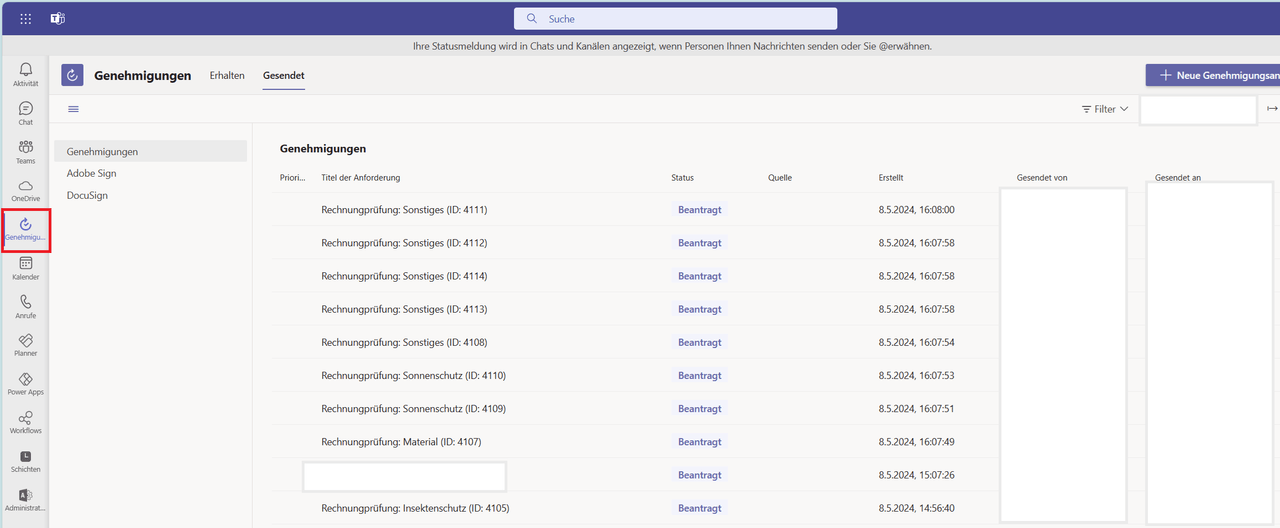 Figure: Teams Approvals overview - every invoice with current status, approver, and payment deadline at a glance
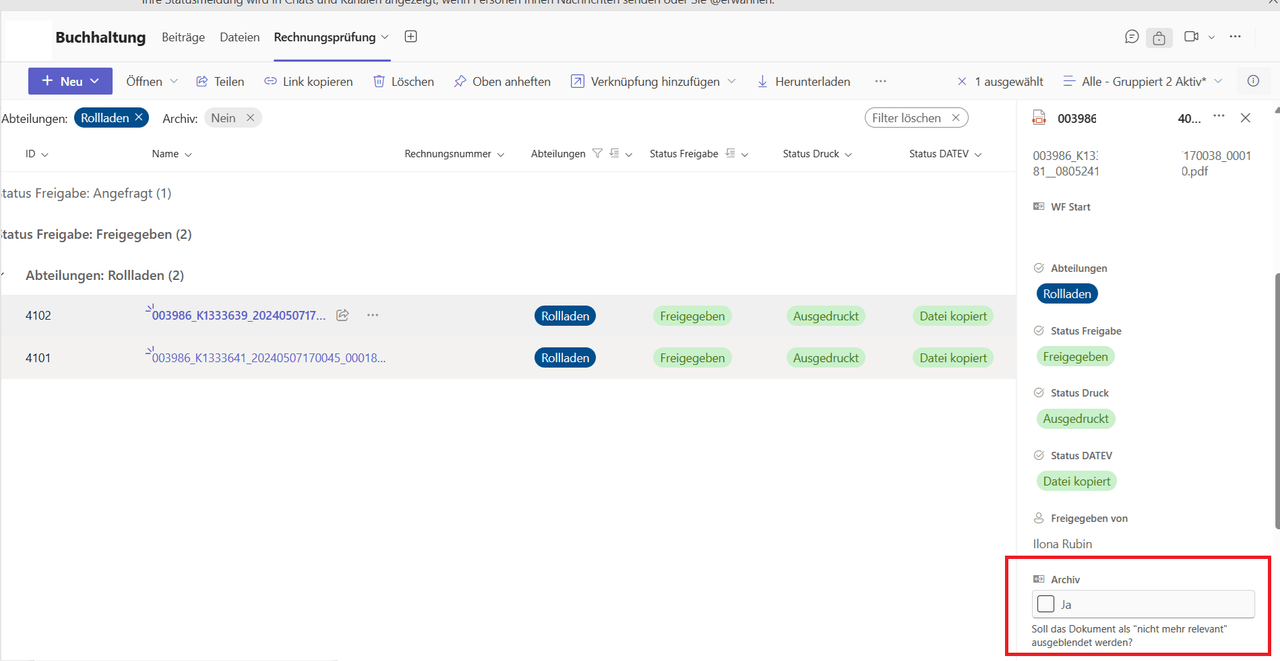 Figure: Status overview of all documents in SharePoint, embedded in Microsoft Teams - with department, approval status, print status, and DATEV status
Step 4: Complete Audit Trail
Every step in the approval process is logged: when was the invoice submitted? Who approved it and when? Was there a deputy forwarding? This workflow history is accessible at any time - essential for audits, for working with the tax advisor, and for internal traceability.
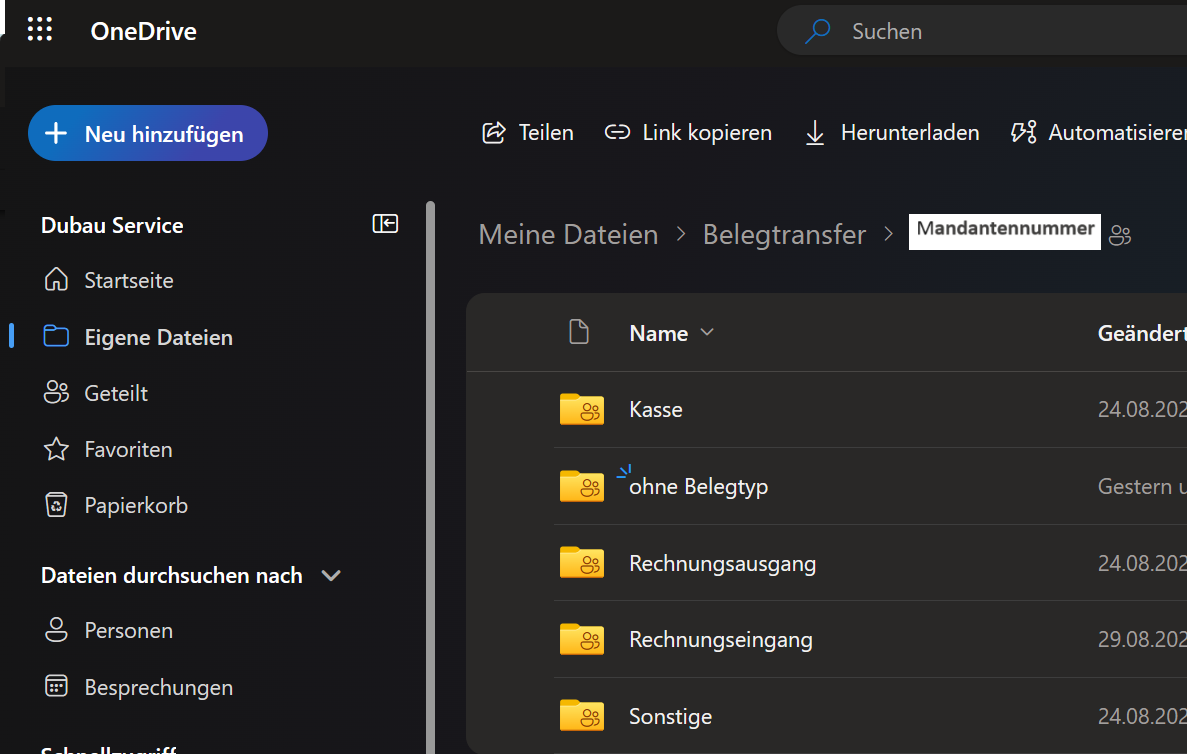 Figure: OneDrive interface overview for DATEV document transfer
Step 5: Dashboard for Accounting
In addition to the SharePoint overview, a Power Apps canvas app serves as an operational dashboard. The accountant sees at a glance: how many invoices are open? Which payment deadlines are approaching? Which approver is slowest to respond? This makes bottlenecks visible and enables proactive action instead of reactive searching.
The End-to-End Process
- Invoice receipt - Email with PDF arrives, Power Automate detects and processes automatically
- Filing - Invoice stored in SharePoint, metadata extracted
- Approval routing - Flow determines the responsible approver from the matrix
- Deputy check - Automatic forwarding if primary approver is absent
- Teams approval - Adaptive card with preview and one-click decision
- Status update - SharePoint updated automatically, accounting sees live status
- Archiving - Approved invoice filed with complete workflow history
Results
After 4 weeks in production, the numbers were clear:
Processing time: 42 hours → 4 hours per month. A 90 percent reduction. The accountant now spends her time on exceptions and edge cases - not on routine routing.
Average 2.3 hours to first approval action. Previously: several days. The adaptive card in Teams makes approvals as easy as answering a chat message.
Zero missed payment deadlines since go-live. Colour-coded status indicators and automatic escalation ensure critical deadlines no longer slip through.
Complete transparency. Anyone on the team can check the status of any invoice at any time - without asking around, without searching through emails.
No additional software costs. The entire solution runs on the existing Microsoft 365 licence. Power Automate, SharePoint, Teams - everything was already paid for.
We implemented a similar approach for a planning office with DATEV integration, where invoices are additionally exported as XML to the tax advisor. And for a trades company, we moved the entire approval process into Microsoft Teams - replacing physical circulation folders entirely.
All Power Platform functions at a glance
Find the right expression - filter, search and copy with our Function Explorer.
Technology Stack
- Microsoft Power Automate - Email monitoring, approval flow, deputy logic, escalation
- SharePoint Online - Invoice library with metadata, approval matrix, status tracking
- Microsoft Teams - Adaptive cards for approval actions directly in chat
- Power Apps - Dashboard for open invoices and payment deadlines
- Outlook - Out-of-office detection for automatic deputy forwarding
More Use Cases

Vacation Requests by Email? That's History.
How a trading company with 45 employees reduced vacation approval time from 3 days to 2 hours - using Power Apps, Power Automate, and Microsoft Teams. No additional software required.

From Notepad to PDF in 10 Minutes - a Product Configurator for Sunshade Contractors
A sunshade contractor with 30 employees replaced paper-based quoting with a Power App. On-site configuration, automatic PDF generation, e-signature, and seamless document filing - all in one flow.

Invoice Approval in Microsoft Teams - From Physical Folder to Digital Collaboration Hub
How a trade company fully integrated invoice approval into Microsoft Teams and eliminated Skonto losses.